FreeWindows 10/11No account needed

Note Tagger
Note Tagger

Tag what matters.

Colour-code any passage in your notes. Show, fade, or hide each tag with one click. A lightweight desktop tool that stays out of your way.

Version 1.0 · ~5 MB · No installer required

About Note Tagger

Everything you need for organised, annotated notes

Note Tagger is a multi-purpose note-taking application. Record college or university lectures and citations, minutes of meetings, legal notes and case law, research notes — in fact anything you want to store and retrieve later.

A full rich-text editor with Word-style formatting commands lets you write, structure, and style your notes in familiar surroundings.

Organise notes across multiple notebooks with no limit on the number of notes per notebook. Each note can carry attachments — common formats such as PDFs and image files can be opened and viewed directly inside the app, without leaving Note Tagger.

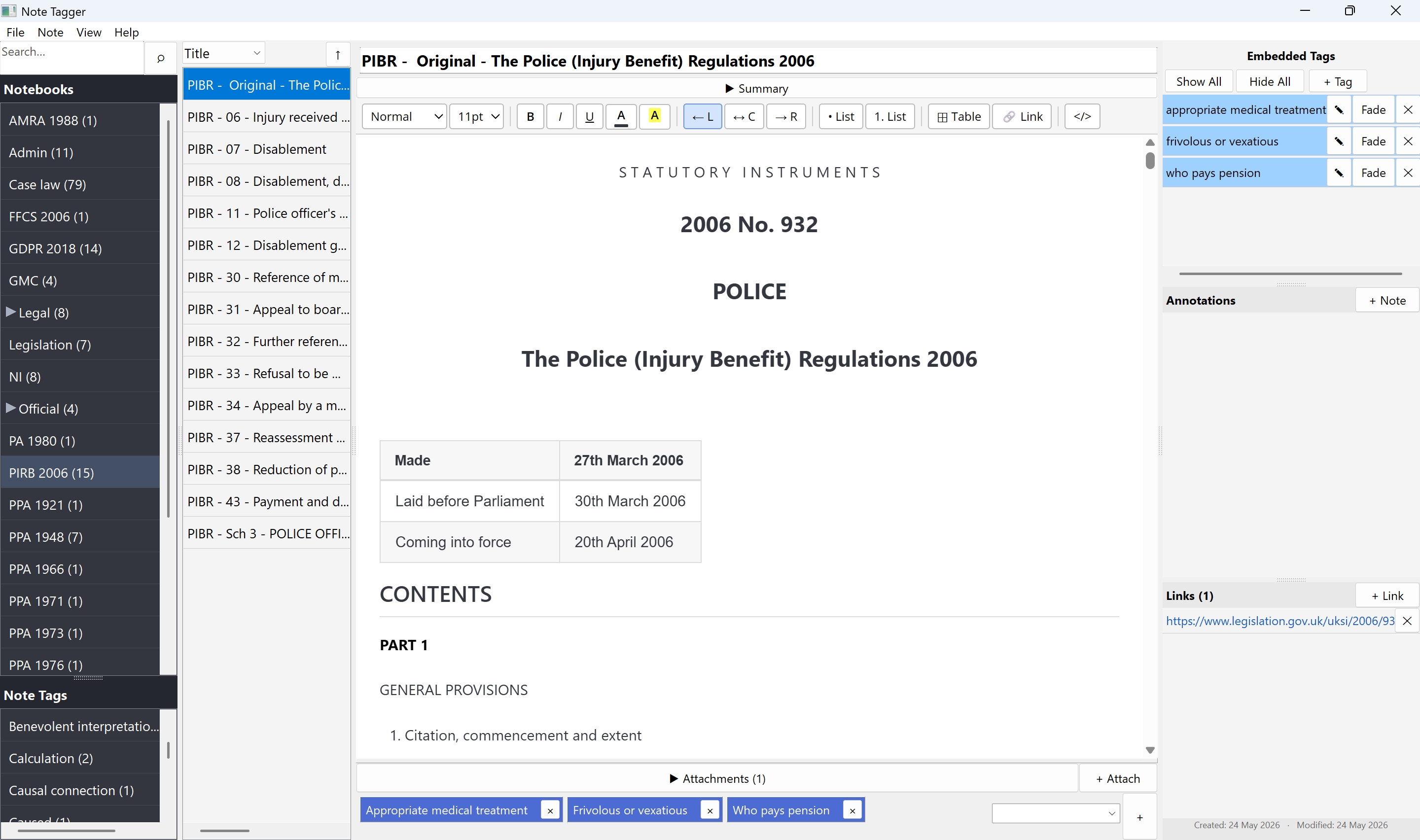
And with Note Tagger's unique embedded tagging, you can highlight any passage of text and retrieve it instantly — exactly as shown in the animated preview above.

  • Full rich-text editor with Word-style formatting
  • Multiple notebooks containing unlimited notes
  • PDF and image attachments, viewed in-app
  • Full-text search across every note in the application
  • Keyword note tags to group and filter related notes
  • Embedded tags — colour-highlight any text passage for instant retrieval
  • Each note may be individually annotated with free-text reference notes
  • All data stored locally — no cloud, no account, no subscription
  • Portable executable — runs from anywhere, no installation needed

See it in action

A complete workspace for your notes

Note Tagger showing a legal reference document with three embedded tags highlighted in the right-hand panel

Note Tagger in use — annotating legal reference material with embedded tags. The right panel lists every tagged passage; each can be shown, faded, or removed independently.

Key features

Built for people who annotate

Embedded tags

Select any passage of text, assign a label and a colour. Tags stay anchored to the exact words — show, fade, or remove them from the tag panel at any time.

Your data, your machine

Everything is stored in a single SQLite file on your computer. No account, no cloud service, no subscription. Your notes go nowhere and are always available offline.

Lightweight by design

Under 5 MB. No installer, no Electron, no runtime to manage. Drop notetagger.exe anywhere and run it. Works on any 64-bit Windows 10 or 11 machine.

Getting started

Up and running in minutes

1

Download and run

No installer needed. Place notetagger.exe anywhere you like and open it. Your notes database is created automatically on first run.

2

Write or paste your notes

Create notebooks and add notes with the full rich-text editor. Paste content from Word, a browser, or any other source, or type directly.

3

Tag and highlight

Select any passage, click Add Tag, and choose a label and colour. Use the embedded tag panel to show, fade, or hide highlights whenever you need them.

Ready to tag what matters?

Free to download and keep. No account, no subscription, no catch.

Download Note Tagger — Free

Windows 10 & 11 · 64-bit · ~5 MB · v1.0

System requirements

Windows 10 or Windows 11 64-bit processor WebView2 runtime — pre-installed on Windows 11; download for Windows 10 ↗ No internet connection required

Get in touch

Questions or feedback?

Message sent — thank you! I’ll get back to you shortly.
Note Tagger

Freeware · No cloud · No tracking · Your notes stay on your machine

Enjoying Note Tagger?

It’s free, and always will be. If it saves you time, a coffee would be very much appreciated — it helps keep the project going.

Scan to buy me a coffee Scan with your phone — or click to open the page